 TunaiPro
User guide › Forms
How to edit a form如何编辑表单Cara Mengedit Borang
5 steps · with screenshots5 个步骤 · 附截图5 langkah · dengan tangkapan skrin
Quick answer
How to edit a form in TunaiPro in 5 steps:
- Open the Form section
- Tap the form entry you want to edit
- Tap ••• to enable editing
- Update the answers in the Q&A section
- Tap Save to apply your changes
快速答案
在 TunaiPro 中编辑表单,共 5 个步骤:
- 进入「表单」栏目
- 点击要编辑的表单记录
- 点击「…」进入编辑
- 在「Q&A」栏目中修改答案
- 点击「Save」保存修改
Jawapan ringkas
Cara Mengedit Borang dalam TunaiPro, 5 langkah:
- Pergi ke bahagian Form
- Ketik rekod borang yang mahu diedit
- Ketik ••• untuk boleh edit
- Kemas kini jawapan dalam bahagian Q&A
- Ketik Save untuk simpan perubahan
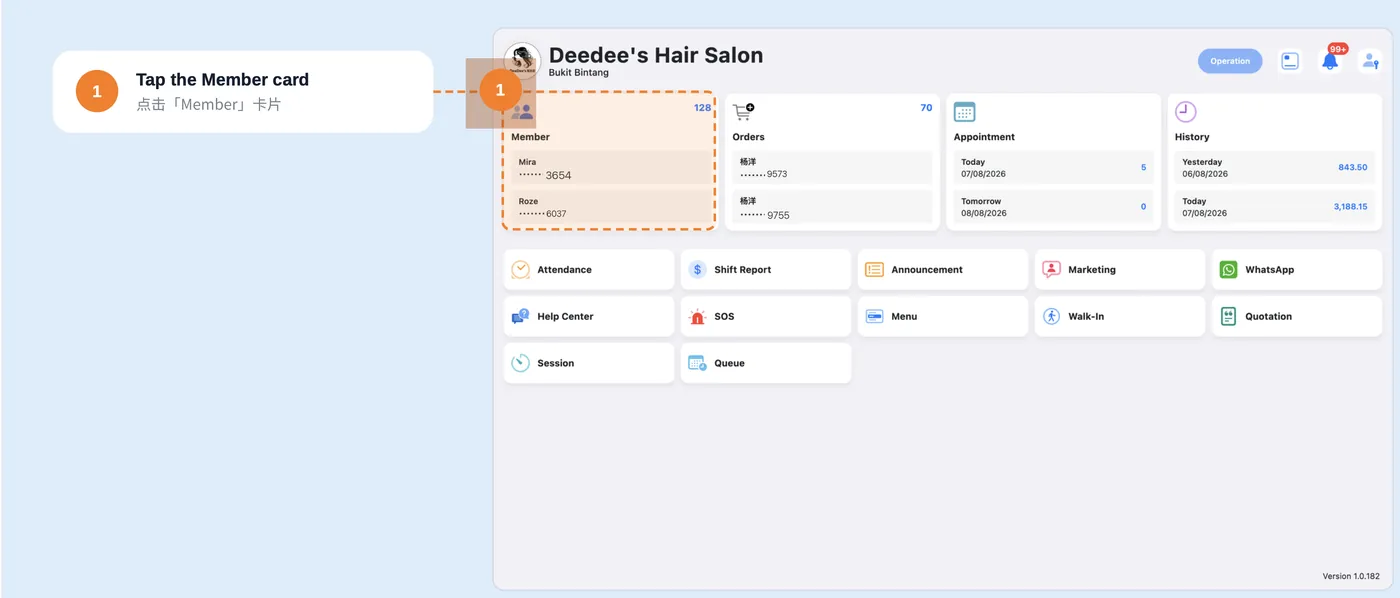
Open the Form section进入「表单」栏目Pergi ke bahagian Form

Tip Select a member, scroll down to Form. Every filled-in form for that member is listed here.选择一位会员,向下滑动至「Form」栏目,该会员所有已填写的表单都列在这里。Pilih seorang ahli, skrol ke bawah ke bahagian Form. Semua borang yang telah diisi disenaraikan di sini.
Tap the form entry you want to edit点击要编辑的表单记录Ketik rekod borang yang mahu diedit

Tip Each dated entry is a filled-in form. Tap the one you need — its details open on the right.每一条带日期的记录都是一份已填写的表单,点击所需记录,右侧会显示详情。Setiap rekod bertarikh adalah borang yang telah diisi. Ketik yang diperlukan — butirannya dibuka di kanan.
Tap ••• to enable editing点击「…」进入编辑Ketik ••• untuk boleh edit
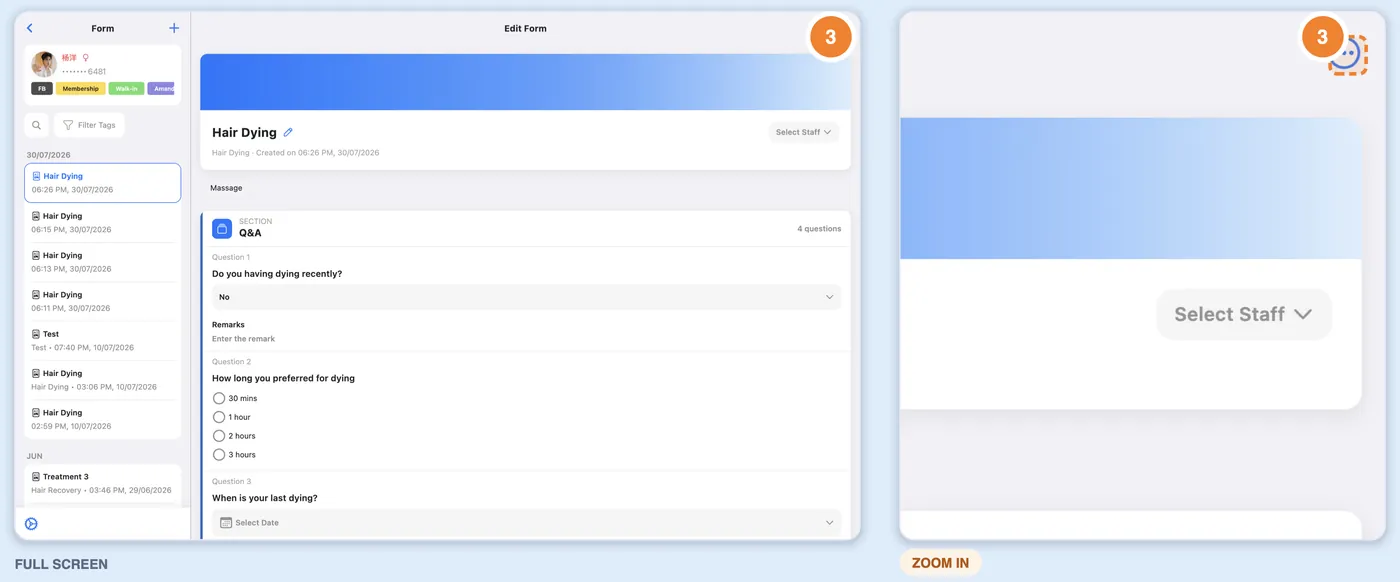
Tip The form opens in preview mode first. Tap the ••• menu at the top right, then choose Edit.表单会先以预览模式打开,点击右上角的「…」菜单,再选择「Edit」。Borang dibuka dalam mod pratonton dahulu. Ketik menu ••• di atas kanan, kemudian pilih Edit.
Update the answers in the Q&A section在「Q&A」栏目中修改答案Kemas kini jawapan dalam bahagian Q&A
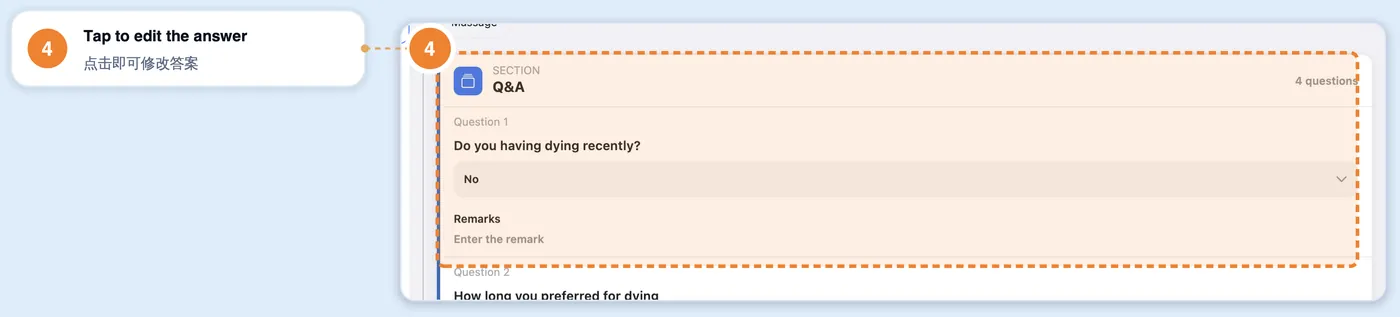
Tip Tap any question to change its answer, or update the remark text below it.点击任意问题即可修改答案,也可以更新下方的备注内容。Ketik mana-mana soalan untuk tukar jawapan, atau kemas kini teks catatan di bawahnya.
Tap Save to apply your changes点击「Save」保存修改Ketik Save untuk simpan perubahan
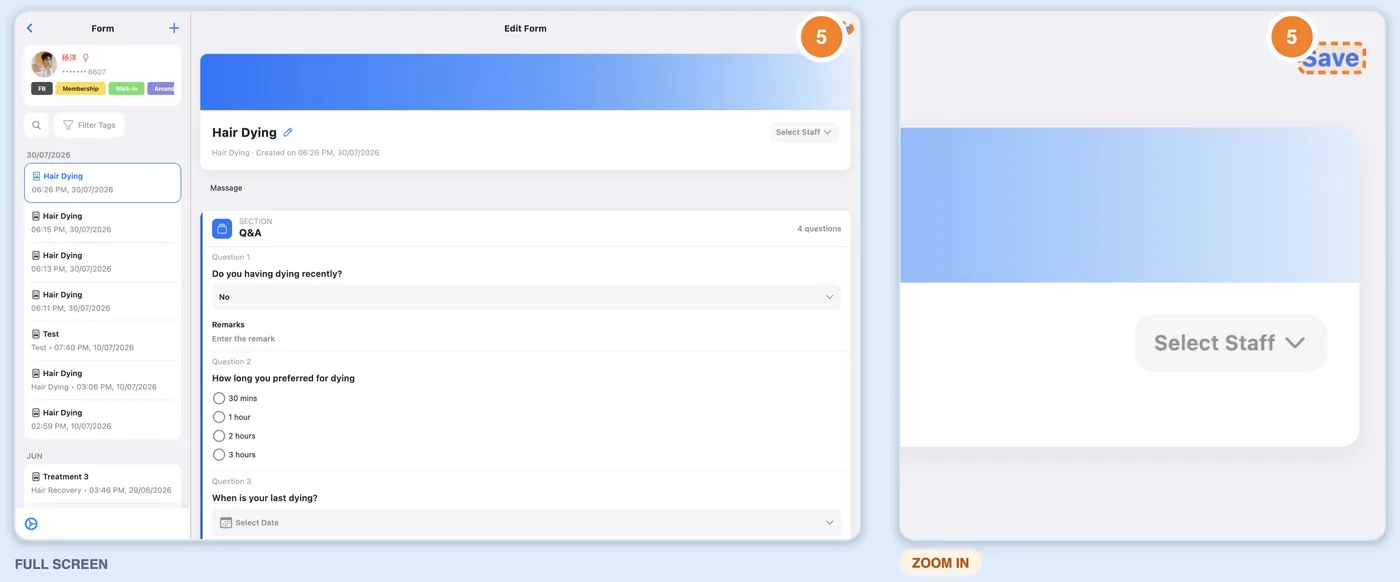
Tip Once Edit is on, the same top-right spot shows Save. Tap it to apply your changes to the form.进入编辑状态后,右上角会变成「Save」,点击即可保存对表单的修改。Selepas mod Edit aktif, ruang atas kanan yang sama menjadi Save. Ketik untuk simpan perubahan pada borang.
More guides更多教程Panduan lain
New to TunaiPro? See it on your own shop.第一次了解 TunaiPro?用您的店来演示。Baru dengan TunaiPro? Lihat dengan kedai anda sendiri.
Book a free demo预约免费演示Tempah demo percuma